ラボの説明
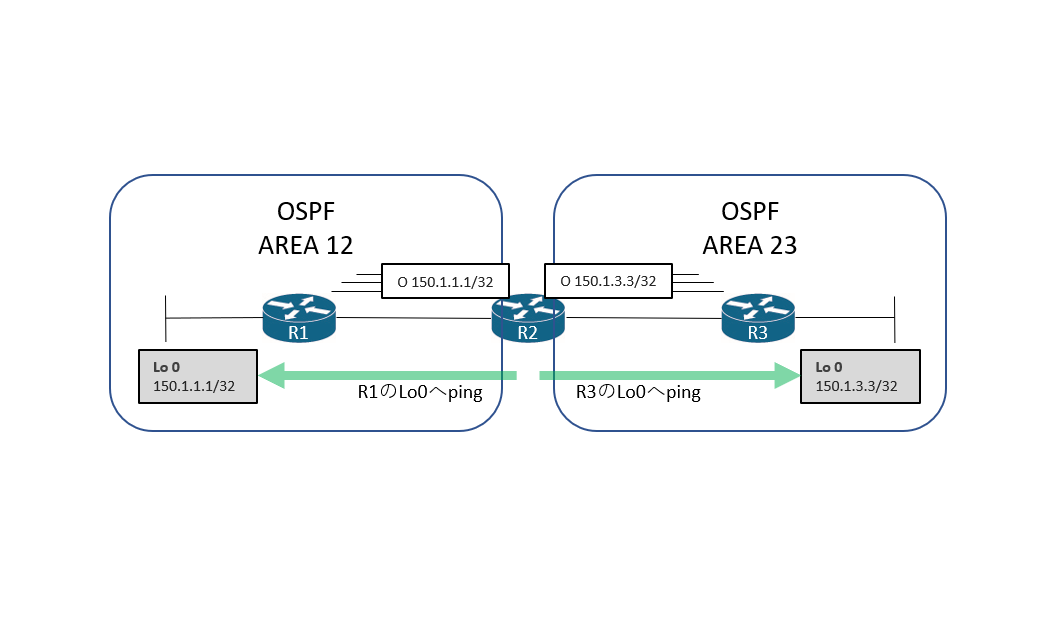
このラボではOSPFの有効化について学習します。有効化の方法にはルーターコンフィギュレーションモードで設定する方法とインターフェースコンフィギュレーションモードで設定する方法の2種類があります。この2種類の方法でR1、R2、R3でOSPFを有効化してネイバーを構築し、R2がR1とR3のループバックアドレス宛の経路情報を学習することを確認します。そしてR2から学習したループバックアドレス宛にpingを実施して成功することを確認します。
ラボ構成図
イニシャルコンフィグ
R1:
version 15.6
no service timestamps debug uptime
no service timestamps log uptime
no service password-encryption
!
hostname R1
!
no ip domain lookup
ip cef
ipv6 unicast-routing
ipv6 cef
!
interface Loopback0
 ip address 150.1.1.1 255.255.255.255
 ipv6 address 2001:150:1:1::1/128
!
interface GigabitEthernet0/1
 no ip address
 duplex auto
 speed auto
 media-type rj45
 no shutdown
!
interface GigabitEthernet0/1.12
 encapsulation dot1Q 12
 ip address 155.1.12.1 255.255.255.0
 ipv6 address 2001:155:1:12::1/64
!
line con 0
 exec-timeout 0 0
 privilege level 15
 logging synchronous
line aux 0
line vty 0 4
 privilege level 15
 no login
 transport input none
!
end
R2:
version 15.6
no service timestamps debug uptime
no service timestamps log uptime
no service password-encryption
!
hostname R2
!
no ip domain lookup
ip cef
ipv6 unicast-routing
ipv6 cef
!
interface Loopback0
ip address 150.1.2.2 255.255.255.255
ipv6 address 2001:150:2:2::2/128
!
interface GigabitEthernet0/1
no ip address
duplex auto
speed auto
media-type rj45
no shutdown
!
interface GigabitEthernet0/1.12
encapsulation dot1Q 12
ip address 155.1.12.2 255.255.255.0
ipv6 address 2001:155:1:12::2/64
!
interface GigabitEthernet0/1.23
encapsulation dot1Q 23
ip address 155.1.23.2 255.255.255.0
ipv6 address 2001:155:1:23::2/64
!
line con 0
exec-timeout 0 0
privilege level 15
logging synchronous
line aux 0
line vty 0 4
privilege level 15
no login
transport input none
!
endR3:
version 15.6
no service timestamps debug uptime
no service timestamps log uptime
no service password-encryption
!
hostname R3
!
no ip domain lookup
ip cef
ipv6 unicast-routing
ipv6 cef
!
interface Loopback0
ip address 150.1.3.3 255.255.255.255
ipv6 address 2001:150:3:3::3/128
!
interface GigabitEthernet0/1
no ip address
duplex auto
speed auto
media-type rj45
no shutdown
!
interface GigabitEthernet0/1.23
encapsulation dot1Q 23
ip address 155.1.23.3 255.255.255.0
ipv6 address 2001:155:1:23::3/64
!
line con 0
exec-timeout 0 0
privilege level 15
logging synchronous
line aux 0
line vty 0 4
privilege level 15
no login
transport input none
!
end
タスク
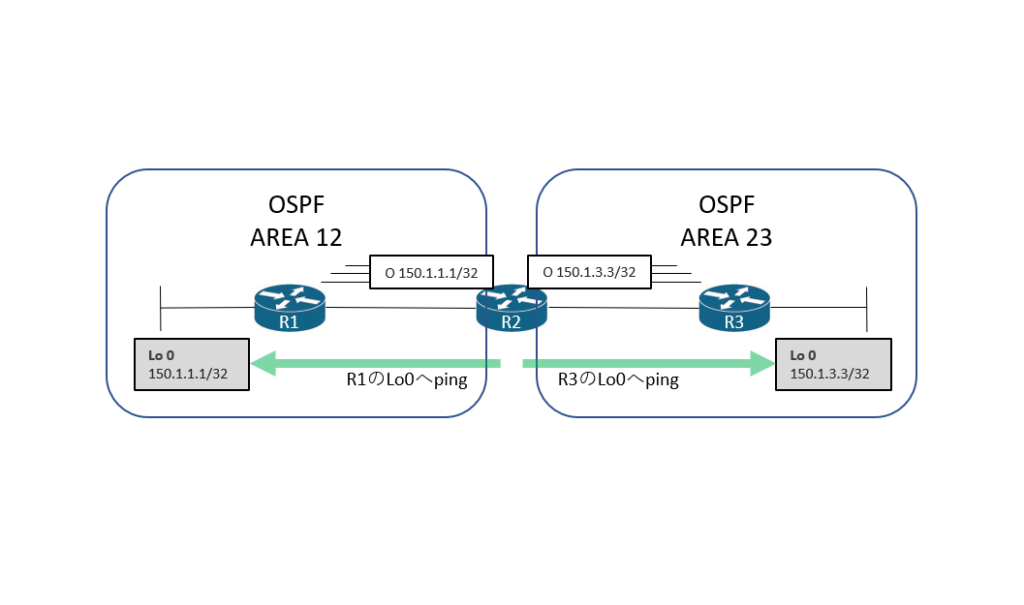
- R1、R2、R3でプロセスID1を使用してOSPFを構成します
- R1とR2をエリア12に所属させます
- R3とR2をエリア23に所属させます
- R1とR2はルータコンフィギュレーションモードでOSPFを有効にします
- R3はインターフェイスコンフィギュレーションモードでOSPFを有効にします
- R2はR1とR3のループバックアドレス宛の経路情報を学習する必要があります
- R2からR1とR3のループバックアドレスへPingを実施して成功することを確認します
サンプルコンフィグ
R1:
router ospf 1
 network 155.1.12.1 0.0.0.0 area 12
 network 150.1.1.1 0.0.0.0 area 12

R2:
router ospf 1
 network 155.1.12.2 0.0.0.0 area 12
 network 155.1.23.2 0.0.0.0 area 23

R3:
interface GigabitEthernet0/1.23
 ip ospf 1 area 23
!
interface loopback 0
 ip ospf 1 area 23
検証
OSPFプロセスを有効にする前にOSPFの隣接関係が確立していないことを確認します。 show ip ospf neighbor コマンドでOSPFが確立していることを確認できますが、OSPFが有効になっていないため出力がありません。
R1#show ip ospf neighbor
R1#
!
R2#show ip ospf neighbor
R2#
!
R3#show ip ospf neighbor
R3#
R1からR3でOSPFを有効化します。R1およびR2は router ospf の後にプロセスIDを入力します。プロセスIDは1~65535で指定します。プロセスIDは、ローカルのルータ内でプロセスを識別するための値なので、他のルータと値を合わせる必要はありません。次にOSPFを有効にするインターフェイスを指定します。R1およびR2はルータコンフィギュレーションモードで network コマンドの後にOSPFを有効にしたいインターフェイスのIPアドレスを指定します。続けてワイルドカードマスクを指定します。そのまま利用する部分を指定する場合は0を使用し、任意の値となる部分を1で指定します。最後にOSPFを有効にするIPアドレスが所属するエリアIDを指定します。
R3はインターフェイスコンフィギュレーションモードでOSPFを有効にします。OSPFを有効にしたいインターフェイスに入り ip ospf のあとにプロセスIDを入力します。その後エリアIDを入力します。
R1:
router ospf 1
 network 155.1.12.1 0.0.0.0 area 12
 network 150.1.1.1 0.0.0.0 area 12

R2:
router ospf 1
 network 155.1.12.2 0.0.0.0 area 12
 network 155.1.23.2 0.0.0.0 area 23

R3:
interface GigabitEthernet0/1.23
 ip ospf 1 area 23
!
interface loopback 0
 ip ospf 1 area 23
OSPFが有効になりネイバー関係が確立するとOSPFのステータスがFULLになりログメッセージが通知されます。
R1(config-router)#
%OSPF-5-ADJCHG: Process 1, Nbr 150.1.2.2 on GigabitEthernet0/1.12 from LOADING to FULL, Loading Done
!
R2(config-router)#
%OSPF-5-ADJCHG: Process 1, Nbr 150.1.1.1 on GigabitEthernet0/1.12 from LOADING to FULL, Loading Done
%OSPF-5-ADJCHG: Process 1, Nbr 150.1.3.3 on GigabitEthernet0/1.23 from LOADING to FULL, Loading Done
!
R3(config-router)#
%OSPF-5-ADJCHG: Process 1, Nbr 150.1.2.2 on GigabitEthernet0/1.23 from LOADING to FULL, Loading Done
show ip ospf neighbor コマンドでOSPFの隣接関係を確認します。R1およびR3は、R2と隣接関係を結んでいるためR2のループバックアドレスが表示されています。R2はR1およびR3と隣接関係を結んでいるためR1およびR3のループバックアドレスが表示されています。ネイバーIDに表示されるアドレスはOSPFルーターIDです。この検証ではOSPFルーターIDを明示的に指定していないため、アクティブなループバックインターフェイスがOSPFルーターIDに選出されます。ループバックアドレスがアクティブでない場合、アクティブな物理インターフェイスの中で最も数値が大きいIPアドレスがOSPFルーターIDに選出されます。
R1#show ip ospf neighbor

Neighbor ID     Pri   State           Dead Time   Address         Interface
150.1.2.2         1   FULL/BDR        00:00:36    155.1.12.2      GigabitEthernet0/1.12
!
!
R2#show ip ospf neighbor

Neighbor ID     Pri   State           Dead Time   Address         Interface
150.1.1.1         1   FULL/DR         00:00:32    155.1.12.1      GigabitEthernet0/1.12
150.1.3.3         1   FULL/DR         00:00:33    155.1.23.3      GigabitEthernet0/1.23
!
!
R3#show ip ospf neighbor

Neighbor ID     Pri   State           Dead Time   Address         Interface
150.1.2.2         1   FULL/BDR        00:00:35    155.1.23.2      GigabitEthernet0/1.23
show ip ospf interface でOSPFが動作しているか確認することができます。また、ネットワークコマンドまたはインターフェースコマンドどちらでOSPFを有効にしたのかが確認できます。R1およびR2はネットワークコマンドで有効にしているため Network Statement と表示されています。R3はインタフェースコマンドで有効にしたため Interface Enable と表示されています。
また、OSPFではHelloインターバルやDeadインターバル、サブネットマスク、スタブかどうかのフラグ、エリアID、認証情報が一致しなければネイバーとなりません。
R1#show ip ospf interface
Loopback0 is up, line protocol is up
  Internet Address 150.1.1.1/32, Area 12, Attached via Network Statement
  Process ID 1, Router ID 150.1.1.1, Network Type LOOPBACK, Cost: 1
  Topology-MTID    Cost    Disabled    Shutdown      Topology Name
        0           1         no          no            Base
  Loopback interface is treated as a stub Host
GigabitEthernet0/1.12 is up, line protocol is up
  Internet Address 155.1.12.1/24, Area 12, Attached via Network Statement
  Process ID 1, Router ID 150.1.1.1, Network Type BROADCAST, Cost: 1
  Topology-MTID    Cost    Disabled    Shutdown      Topology Name
        0           1         no          no            Base
  Transmit Delay is 1 sec, State BDR, Priority 1
  Designated Router (ID) 150.1.2.2, Interface address 155.1.12.2
  Backup Designated router (ID) 150.1.1.1, Interface address 155.1.12.1
  Timer intervals configured, Hello 10, Dead 40, Wait 40, Retransmit 5
    oob-resync timeout 40
    Hello due in 00:00:05
  Supports Link-local Signaling (LLS)
  Cisco NSF helper support enabled
  IETF NSF helper support enabled
  Index 1/1/1, flood queue length 0
  Next 0x0(0)/0x0(0)/0x0(0)
  Last flood scan length is 1, maximum is 1
  Last flood scan time is 1 msec, maximum is 1 msec
  Neighbor Count is 1, Adjacent neighbor count is 1
    Adjacent with neighbor 150.1.2.2  (Designated Router)
  Suppress hello for 0 neighbor(s)
R2#show ip ospf interface
GigabitEthernet0/1.12 is up, line protocol is up
Internet Address 155.1.12.2/24, Area 12, Attached via Network Statement
Process ID 1, Router ID 150.1.2.2, Network Type BROADCAST, Cost: 1
Topology-MTID Cost Disabled Shutdown Topology Name
0 1 no no Base
Transmit Delay is 1 sec, State BDR, Priority 1
Designated Router (ID) 150.1.1.1, Interface address 155.1.12.1
Backup Designated router (ID) 150.1.2.2, Interface address 155.1.12.2
Timer intervals configured, Hello 10, Dead 40, Wait 40, Retransmit 5
oob-resync timeout 40
Hello due in 00:00:06
Supports Link-local Signaling (LLS)
Cisco NSF helper support enabled
IETF NSF helper support enabled
Index 1/1/1, flood queue length 0
Next 0x0(0)/0x0(0)/0x0(0)
Last flood scan length is 1, maximum is 1
Last flood scan time is 0 msec, maximum is 0 msec
Neighbor Count is 1, Adjacent neighbor count is 1
Adjacent with neighbor 150.1.1.1 (Designated Router)
Suppress hello for 0 neighbor(s)
GigabitEthernet0/1.23 is up, line protocol is up
Internet Address 155.1.23.2/24, Area 23, Attached via Network Statement
Process ID 1, Router ID 150.1.2.2, Network Type BROADCAST, Cost: 1
Topology-MTID Cost Disabled Shutdown Topology Name
0 1 no no Base
Transmit Delay is 1 sec, State DR, Priority 1
Designated Router (ID) 150.1.2.2, Interface address 155.1.23.2
Backup Designated router (ID) 150.1.3.3, Interface address 155.1.23.3
Timer intervals configured, Hello 10, Dead 40, Wait 40, Retransmit 5
oob-resync timeout 40
Hello due in 00:00:05
Supports Link-local Signaling (LLS)
Cisco NSF helper support enabled
IETF NSF helper support enabled
Index 1/1/2, flood queue length 0
Next 0x0(0)/0x0(0)/0x0(0)
Last flood scan length is 0, maximum is 1
Last flood scan time is 1 msec, maximum is 1 msec
Neighbor Count is 1, Adjacent neighbor count is 1
Adjacent with neighbor 150.1.3.3 (Backup Designated Router)
Suppress hello for 0 neighbor(s)R3#show ip ospf interface
Loopback0 is up, line protocol is up
Internet Address 150.1.3.3/32, Area 23, Attached via Interface Enable
Process ID 1, Router ID 150.1.3.3, Network Type LOOPBACK, Cost: 1
Topology-MTID Cost Disabled Shutdown Topology Name
0 1 no no Base
Enabled by interface config, including secondary ip addresses
Loopback interface is treated as a stub Host
GigabitEthernet0/1.23 is up, line protocol is up
Internet Address 155.1.23.3/24, Area 23, Attached via Interface Enable
Process ID 1, Router ID 150.1.3.3, Network Type BROADCAST, Cost: 1
Topology-MTID Cost Disabled Shutdown Topology Name
0 1 no no Base
Enabled by interface config, including secondary ip addresses
Transmit Delay is 1 sec, State DR, Priority 1
Designated Router (ID) 150.1.3.3, Interface address 155.1.23.3
Backup Designated router (ID) 150.1.2.2, Interface address 155.1.23.2
Timer intervals configured, Hello 10, Dead 40, Wait 40, Retransmit 5
oob-resync timeout 40
Hello due in 00:00:00
Supports Link-local Signaling (LLS)
Cisco NSF helper support enabled
IETF NSF helper support enabled
Index 1/1/1, flood queue length 0
Next 0x0(0)/0x0(0)/0x0(0)
Last flood scan length is 1, maximum is 2
Last flood scan time is 1 msec, maximum is 1 msec
Neighbor Count is 1, Adjacent neighbor count is 1
Adjacent with neighbor 150.1.2.2 (Backup Designated Router)
Suppress hello for 0 neighbor(s)
次に OSPFのデータベース情報を確認します。エリア12に属しているR1とR2のタイプ1LSAがリストされていることがわかります。R1はR3側エリア23の情報をタイプ3LSAで受信したいところですが、なぜ受信できないのでしょうか。それはエリア0バックボーンエリアに接続していないため、R2はR1にタイプ3LSAを教えません。
R1#show ip ospf database

            OSPF Router with ID (150.1.1.1) (Process ID 1)

                Router Link States (Area 12)

Link ID         ADV Router      Age         Seq#       Checksum Link count
150.1.1.1       150.1.1.1       517         0x8000000E 0x007381 2
150.1.2.2       150.1.2.2       360         0x8000000E 0x00BCDD 1

                Net Link States (Area 12)

Link ID         ADV Router      Age         Seq#       Checksum
155.1.12.1      150.1.1.1       517         0x8000000D 0x00991C
R2は、エリア12およびエリア23の両方に属しているため両方のエリアでタイプ1LSAがリストされていることがわかります。
R2#show ip ospf database

            OSPF Router with ID (150.1.2.2) (Process ID 1)

                Router Link States (Area 12)

Link ID         ADV Router      Age         Seq#       Checksum Link count
150.1.1.1       150.1.1.1       914         0x8000000E 0x007381 2
150.1.2.2       150.1.2.2       755         0x8000000E 0x00BCDD 1

                Net Link States (Area 12)

Link ID         ADV Router      Age         Seq#       Checksum
155.1.12.1      150.1.1.1       914         0x8000000D 0x00991C

                Router Link States (Area 23)

Link ID         ADV Router      Age         Seq#       Checksum Link count
150.1.2.2       150.1.2.2       755         0x8000000E 0x00B9C9 1
150.1.3.3       150.1.3.3       839         0x8000000E 0x009B34 2

                Net Link States (Area 23)

Link ID         ADV Router      Age         Seq#       Checksum
155.1.23.2      150.1.2.2       755         0x8000000D 0x00376C
R3もR1と同じようにエリア23内のタイプ1LSAがリストされていますが、R1側のエリア12のタイプ3LSAを受信していません。
R3#show ip ospf database

            OSPF Router with ID (150.1.3.3) (Process ID 1)

                Router Link States (Area 23)

Link ID         ADV Router      Age         Seq#       Checksum Link count
150.1.2.2       150.1.2.2       1652        0x8000000F 0x00B7CA 1
150.1.3.3       150.1.3.3       1663        0x8000000F 0x009935 2

                Net Link States (Area 23)

Link ID         ADV Router      Age         Seq#       Checksum
155.1.23.2      150.1.2.2       1652        0x8000000E 0x00356D
次にR1のルーティングテーブルを確認し、R3のループバックアドレスが見えるか確認します。R1はR2からタイプ3LSAを受信していないため他エリアのR3のループバックアドレスを学習していません。
R1#show ip route
Codes: L - local, C - connected, S - static, R - RIP, M - mobile, B - BGP
       D - EIGRP, EX - EIGRP external, O - OSPF, IA - OSPF inter area
       N1 - OSPF NSSA external type 1, N2 - OSPF NSSA external type 2
       E1 - OSPF external type 1, E2 - OSPF external type 2
       i - IS-IS, su - IS-IS summary, L1 - IS-IS level-1, L2 - IS-IS level-2
       ia - IS-IS inter area, * - candidate default, U - per-user static route
       o - ODR, P - periodic downloaded static route, H - NHRP, l - LISP
       a - application route
       + - replicated route, % - next hop override, p - overrides from PfR

Gateway of last resort is not set

      150.1.0.0/32 is subnetted, 1 subnets
C        150.1.1.1 is directly connected, Loopback0
      155.1.0.0/16 is variably subnetted, 2 subnets, 2 masks
C        155.1.12.0/24 is directly connected, GigabitEthernet0/1.12
L        155.1.12.1/32 is directly connected, GigabitEthernet0/1.12
続いてR2のルーティングテーブルを確認します。R2はエリア12とエリア23両方に属している境界ルーターなのでOSPFでR1およびR3のループバックアドレス宛の経路情報を学習しています。
R2#show ip route
Codes: L - local, C - connected, S - static, R - RIP, M - mobile, B - BGP
       D - EIGRP, EX - EIGRP external, O - OSPF, IA - OSPF inter area
       N1 - OSPF NSSA external type 1, N2 - OSPF NSSA external type 2
       E1 - OSPF external type 1, E2 - OSPF external type 2
       i - IS-IS, su - IS-IS summary, L1 - IS-IS level-1, L2 - IS-IS level-2
       ia - IS-IS inter area, * - candidate default, U - per-user static route
       o - ODR, P - periodic downloaded static route, H - NHRP, l - LISP
       a - application route
       + - replicated route, % - next hop override, p - overrides from PfR

Gateway of last resort is not set

      150.1.0.0/32 is subnetted, 3 subnets
O        150.1.1.1 [110/2] via 155.1.12.1, 00:45:27, GigabitEthernet0/1.12
C        150.1.2.2 is directly connected, Loopback0
O        150.1.3.3 [110/2] via 155.1.23.3, 00:44:02, GigabitEthernet0/1.23
      155.1.0.0/16 is variably subnetted, 4 subnets, 2 masks
C        155.1.12.0/24 is directly connected, GigabitEthernet0/1.12
L        155.1.12.2/32 is directly connected, GigabitEthernet0/1.12
C        155.1.23.0/24 is directly connected, GigabitEthernet0/1.23
L        155.1.23.2/32 is directly connected, GigabitEthernet0/1.23
R2からR1とR3のループバックアドレス宛にpingを実施します。OSPFで経路情報を学習しているためpingは成功します。
R2#ping 150.1.1.1
Type escape sequence to abort.
Sending 5, 100-byte ICMP Echos to 150.1.1.1, timeout is 2 seconds:
!!!!!
Success rate is 100 percent (5/5), round-trip min/avg/max = 1/2/4 ms
!
R2#ping 150.1.2.2
Type escape sequence to abort.
Sending 5, 100-byte ICMP Echos to 150.1.2.2, timeout is 2 seconds:
!!!!!
Success rate is 100 percent (5/5), round-trip min/avg/max = 1/1/1 ms
コメント